
[lead-form form-id=1 title=Contact Us]
INP&ID
A Mobile Enabled WiseTools Productivity Tool
What is INP&ID©?
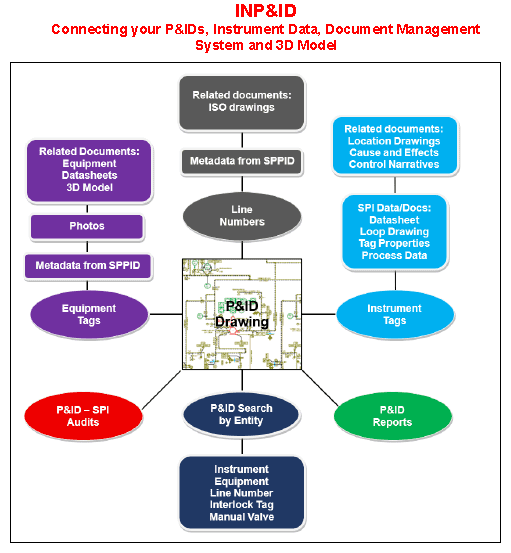
INP&ID is a state-of-the-art web app that converts P&ID instrumentation data from your CAD or SPPID drawings into an easy-to-use, graphic interface similar to INView©. Once implemented, see how INP&ID improves access to P&ID instrumentation data and documents (including external documents on a document management system) and results in significant time savings and enhanced multi-user collaboration.
Three implementations available:
• SPI and P&ID, SPP&ID or CAD
• SPP&ID drawings only, or
• CAD drawings only.

INP&ID© Features
• Batch convert native P&ID files (CAD & SPPID) to intelligent, graphical PDF.
• Click an entity (equipment, instrument tag, interlock, line or manual valve) from the entity list and zoom to it on the P&ID drawing and show a list of related documents including external documents and SPI associated documents.
• A global, as-typed search can find instruments, line numbers, interlocks, equipment numbers, etc. and retrieve and open related P&ID drawing(s). Uses PAU and Project filters to narrow searches.
• Click an instrument bubble on the INP&ID drawing to view related data such as tag properties, datasheets, loop and segment drawings, panel strip wiring reports, HU installations, instrument and panel wiring photos, external documents (file server or document management system) such as control narratives, logic diagrams, cause and effect diagrams, etc. in INView.
• Off-page connectors on INP&ID drawings are linked to related INP&ID drawings.
• Interlock and manual valves are connected to SPP&ID properties.
• View P&ID tagged manual valves and equipment datasheets from a document management system.
• When connected to SPI, equipment and lines are linked to the metadata.
• Uses 3D model links to open equipment in the 3D model using Universal Plant Viewer.
• Photos with titles and descriptions can be uploaded to Equipment.
• Batch print P&ID drawings.
• Built in comparison Audits between INP&ID drawing data and SPI drawing data available to identify mismatched, missing or duplicated data.
• Built-in reports available for determining total drawings, instrument tags, equipment tags, line numbers, interlock tags and unscanned P&IDs in the INP&D database.
• INView and INP&ID are integrated – click an INView P&ID hotlink to view in the drawing in INP&ID and benefit from all its advanced features.
• Admin Module for easy configuration. Includes new logo manager.
• Supports Windows, Anonymous and SAML authentication.